C++的运行环境工具链 msys2
包管理器 pacman 添加 msys2 到 terminal
 {
    // MSYS2
    "guid": "{0caa0dad-35be-5f56-a8ff-afceeeaa6301}",
    "name": "MSYS2",
    "commandline": "D:\\ProgramData\\msys64\\msys2_shell.cmd -msys -defterm -no-start -here",
    "hidden": false,
    "icon":"D:\\ProgramData\\msys64\\msys2.ico",
    "tabTitle":"MSYS2",
    // "colorScheme":"Campbell",
    "colorScheme":"One Half Dark",
    "startingDirectory":"D:\\ProgramData\\msys64\\home\\%USERNAME%",
    "suppressApplicationTitle":true
},
安装 gcc
pacman -S mingw-w64-x86_64-gcc
pacman -S mingw-w64-x86_64-cmake-gui
pacman -S mingw-w64-x86_64-gdb
pacman -S mingw-w64-x86_64-make
安装 flex bison
pacman -S flex
pacman -S bison
vscode 中 Ctrl+Shift+P → CMake: Scan for Kits 来扫描所有的编译器
执行 CMake: Select a Kit
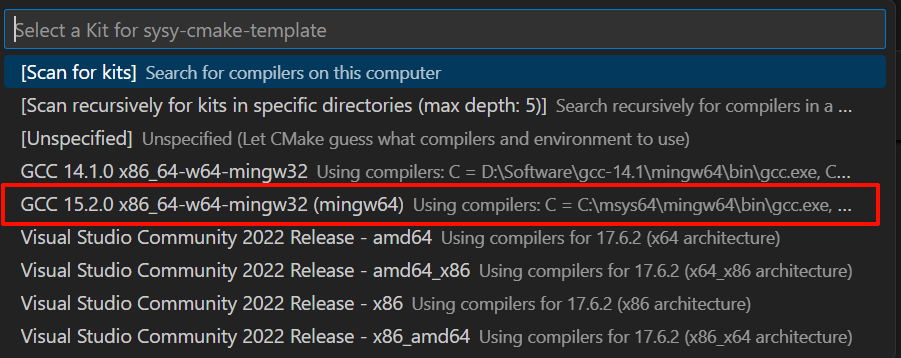
选择 msys 的 gcc
编译项目
PS D:\Code\Rust\sysy-compiler\sysy-cmake-template> cmake -DCMAKE_BUILD_TYPE=Debug -B build
-- Flex/Bison generated source file extension: .cpp
-- Library directory: /native
-- Include directory:
-- Configuring done (0.3s)
-- Generating done (0.0s)
-- Build files have been written to: D:/Code/Rust/sysy-compiler/sysy-cmake-template/build
也可以使用 CMake tools 插件的 build 功能